


Free Circuit Simulation software has become an essential tool for engineers and professionals in various industries, allowing them to design, test, and analyze systems and processes virtually before putting them into practice. With the growing demand for simulation software, the market is flooded with numerous options, both free and paid. In this blog, we’ve compiled a list of the top 5 free circuit simulation software that provide accurate and realistic simulations for circuits, components, and systems. Whether you’re a student, hobbyist, or professional engineer, these tools will help you enhance your skills and bring your projects to life.
1) EasyEDA:
Easy EDA is a browser-based software that requires no installation and offers a user-friendly interface with easy-to-learn simulation tools. It allows for the simulation of both analog and digital circuits. However, its component library is limited compared to other simulation software and it lacks the ability to perform advanced simulations.
Features:
- Browser-based software that requires no installation
- User-friendly interface with easy-to-learn simulation tools
- Ability to simulate both analog and digital circuits
Drawbacks:
- Limited component library compared to other simulation software
- No ability to perform advanced simulations

2) LTSpice:
LTSpice is a widely used circuit simulation software in the industry due to its accuracy in simulating analog circuits and its ease of use. With a library of over 500 passive and active components, it’s a powerful tool for analog circuit design and analysis. However, the software may have a steep learning curve for those who are new to circuit simulation.
Features:
- Library of over 500 passive and active components
- Ability to perform advanced simulations such as noise, distortion, and transient analysis
Drawbacks:
- Steep learning curve for those new to circuit simulation

3) Proteus:
Proteus is a simulation software that allows for the simulation of both analog and digital circuits. It also includes microcontroller simulation, which is a valuable tool for testing and debugging microcontroller-based designs. The user-friendly interface and large component library make it a good choice for those just starting with circuit simulation. However, its simulation capabilities are limited compared to other software, and it may have a steep learning curve for more advanced users.
Features:
- Ability to simulate both analog and digital circuits
- Includes microcontroller simulation, allowing users to test and debug microcontroller-based designs
- User-friendly interface with a large component library
Drawbacks:
- Limited simulation capabilities compared to other software
- Steep learning curve for more advanced users

4) Qucs:
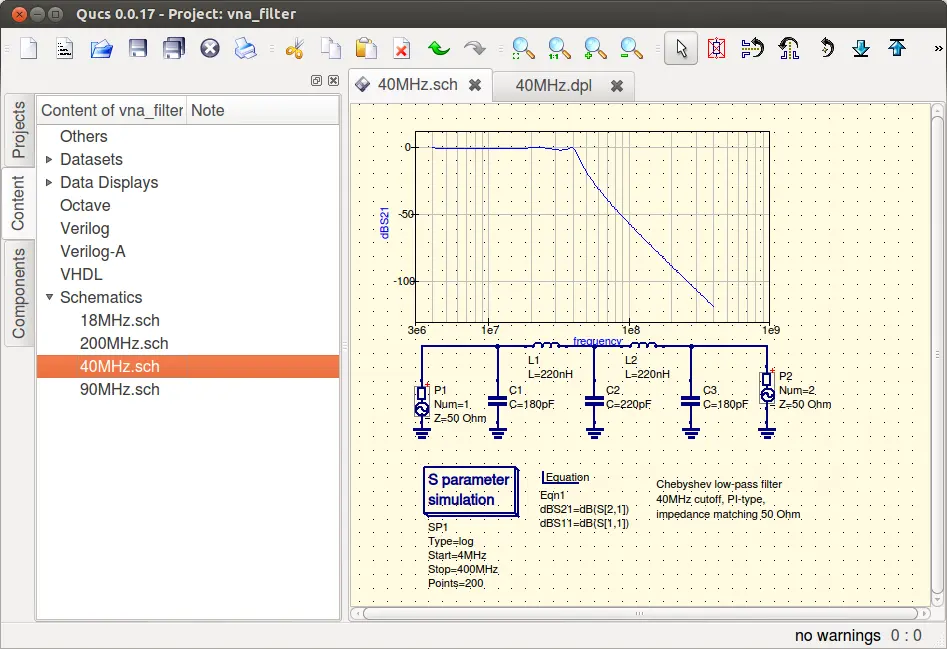
Qucs is an open-source and cross-platform compatible simulation software. It allows for the simulation of both analog and digital circuits, and has a user-friendly interface with a large component library. However, its simulation capabilities are limited compared to other software, and it may have a steep learning curve for more advanced users.
Features:
- Open-source and cross-platform compatibility
- Ability to perform both analog and digital circuit simulations
- User-friendly interface with a large component library
Drawbacks:
- Limited simulation capabilities compared to other software
- Steep learning curve for more advanced users
5) CircuitLab:
CircuitLab is a browser-based circuit simulation software that offers a user-friendly interface and easy-to-learn simulation tools. It also allows for collaboration on circuit designs in real-time with others. However, it does have a limited component library compared to other simulation software and lacks the ability to perform more advanced simulations.
Features:
- Browser-based software that requires no installation
- User-friendly interface and easy-to-learn simulation tools
- Ability to collaborate on circuit designs in real-time with others
Drawbacks:
- Limited component library compared to other simulation software
- No ability to perform more advanced simulations

Conclusion
Each software has its own unique strengths and weaknesses, and the best choice for a particular project will depend on the specific needs and goals of the user. Whether it be a powerful simulation tool like LTSpice or a user-friendly software like CircuitMaker, there is a free circuit simulation software available for everyone.
Learn about Development Board


